---
title: How can I set my LMS notification emails to be instant, so I do not miss anything?
description: Discover how to manage your LMS notification settings, change email digests, and choose how often you receive forum updates.
---
[Skip to content](https://knowledge.ucdpa.ie/help-centre/how-can-i-set-my-lms-notification-emails-to-be-instant-so-i-do-not-miss-anything#main-content)
[Contact Us for More Support](https://knowledge.ucdpa.ie/help-centre/kb-tickets/new?hsLang=en-ie)
[](https://www.ucd.ie/professionalacademy/)
Open main navigation
Close main navigation
- [Contact Us for More Support](https://knowledge.ucdpa.ie/help-centre/kb-tickets/new)
Search our Services and Resources
- There are no suggestions because the search field is empty.
1. [Help Centre](https://knowledge.ucdpa.ie/help-centre?hsLang=en-ie)
2. [LMS](https://knowledge.ucdpa.ie/help-centre/lms?hsLang=en-ie)
# How can I set my LMS notification emails to be instant, so I do not miss anything?
By default, LMS notifications are sent as one daily summary email.
### Please note:
- LMS communication frequency is controlled by individual user settings and the Operations Team cannot change this globally, it must be changed by learners individually.
- These settings are global for your LMS account. Changes will apply to all forums you are subscribed to, across all courses.
### Notification Options
- No Digest (Recommended): You will receive one email for every single
post as soon as it happens.
- Complete (Daily): You receive one email per day containing the full
content of all posts.
- Subjects (Daily): You receive one email per day containing only the
subject lines of posts
Navigate to the LMS

Click your name

Click "Preferences"

Click "Forum preferences"
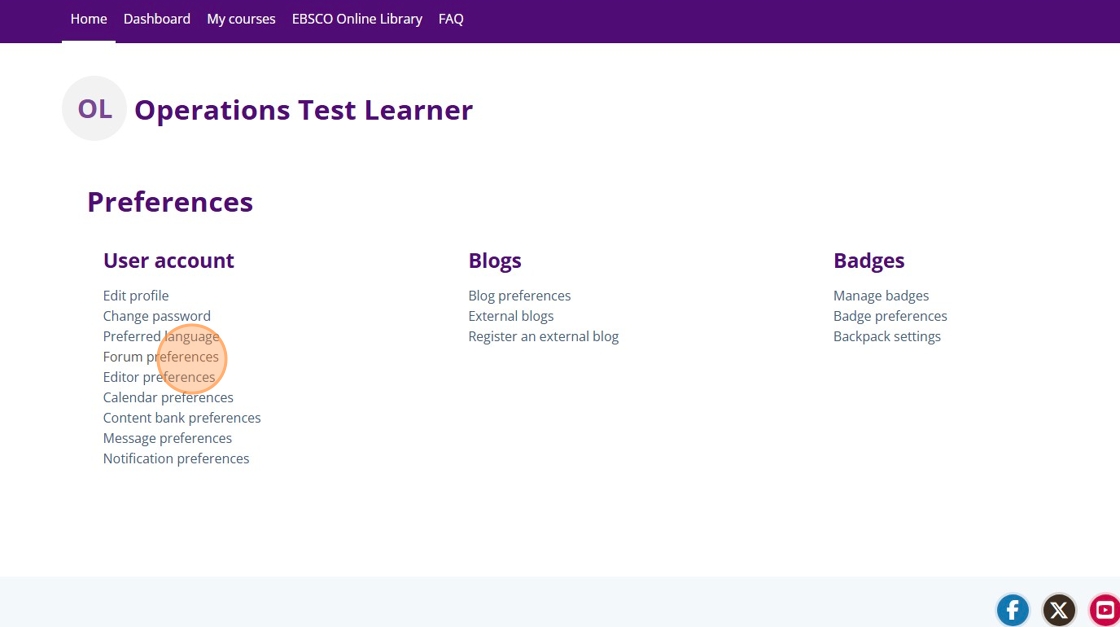
Select the dropdown and update the option to "No digest (single email per forum post)

Click "Save Changes"

- [Assessment Support](https://knowledge.ucdpa.ie/help-centre/assessment-support?hsLang=en-ie)
- [Billing & Payments](https://knowledge.ucdpa.ie/help-centre/billing-payments?hsLang=en-ie)
- [Certification](https://knowledge.ucdpa.ie/help-centre/certification?hsLang=en-ie)
- [Corporate EnrolHub System](https://knowledge.ucdpa.ie/help-centre/corporate-enrolhub-system?hsLang=en-ie)
- [External Digital Services](https://knowledge.ucdpa.ie/help-centre/external-digital-services?hsLang=en-ie)
- [General](https://knowledge.ucdpa.ie/help-centre/general?hsLang=en-ie)
- [Joining the Team](https://knowledge.ucdpa.ie/help-centre/joining-the-team?hsLang=en-ie)
- [LMS](https://knowledge.ucdpa.ie/help-centre/lms?hsLang=en-ie)
- [Masterclasses](https://knowledge.ucdpa.ie/help-centre/masterclasses?hsLang=en-ie)
- [Policies](https://knowledge.ucdpa.ie/help-centre/policies?hsLang=en-ie)
- [Professional Academy Diploma Learners](https://knowledge.ucdpa.ie/help-centre/professional-academy-diploma-learners?hsLang=en-ie#main-content)
- [Part-Time Live Online Learners](https://knowledge.ucdpa.ie/help-centre/professional-academy-diploma-learners?hsLang=en-ie#part-time-live-online-learners)
- [On Demand Learners](https://knowledge.ucdpa.ie/help-centre/professional-academy-diploma-learners?hsLang=en-ie#on-demand-learners)
- [On Campus Learners](https://knowledge.ucdpa.ie/help-centre/professional-academy-diploma-learners?hsLang=en-ie#on-campus-learners)
- [Online Bootcamp Learners](https://knowledge.ucdpa.ie/help-centre/professional-academy-diploma-learners?hsLang=en-ie#online-bootcamp-learners)
- [Professional Academy Skill Sprint Learners](https://knowledge.ucdpa.ie/help-centre/professional-academy-skill-sprint-learners?hsLang=en-ie#main-content)
- [Live Online Learners](https://knowledge.ucdpa.ie/help-centre/professional-academy-skill-sprint-learners?hsLang=en-ie#live-online-learners)
- [On Demand Learners](https://knowledge.ucdpa.ie/help-centre/professional-academy-skill-sprint-learners?hsLang=en-ie#on-demand-learners)
- [Support](https://knowledge.ucdpa.ie/help-centre/support?hsLang=en-ie)
- [Results](https://knowledge.ucdpa.ie/help-centre/results?hsLang=en-ie)
**[Log-in to Learning Management System](https://learn.ucdpa.ie/login/index.php)**
Copyright © 2025, UCD Professional Academy