---
title: How do I take my Skill Sprint attendance?
description: Discover how to self-record your attendance for Skill Sprint sessions.
---
[Skip to content](https://knowledge.ucdpa.ie/help-centre/how-do-i-take-my-professional-academy-skill-sprint-attendance#main-content)
[Contact Us for More Support](https://knowledge.ucdpa.ie/help-centre/kb-tickets/new?hsLang=en-ie)
[](https://www.ucd.ie/professionalacademy/)
Open main navigation
Close main navigation
- [Contact Us for More Support](https://knowledge.ucdpa.ie/help-centre/kb-tickets/new)
Search our Services and Resources
- There are no suggestions because the search field is empty.
1. [Help Centre](https://knowledge.ucdpa.ie/help-centre?hsLang=en-ie)
2. [Professional Academy Skill Sprint Learners](https://knowledge.ucdpa.ie/help-centre/professional-academy-skill-sprint-learners?hsLang=en-ie)
3. [Live Online Learners](https://knowledge.ucdpa.ie/help-centre/professional-academy-skill-sprint-learners?hsLang=en-ie#live-online-learners)
# How do I take my Skill Sprint attendance?
**Please be aware:** Attendance must be recorded within a certain window. The window will open 15 minutes before and close at the end of each session. e.g. If your Skill Sprint is from 1.30PM - 3.30PM you will be able to mark yourself as present from 1.15PM - 3.30PM.
Navigate to your Skill Sprint LMS Page

Click on the Unit you wish to mark your attendance for

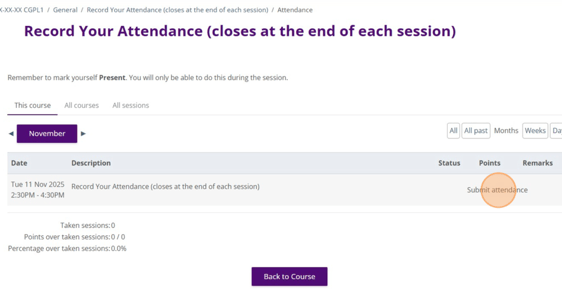
Click "Record Your Attendance (closes at the end of each session)"

Click "Submit attendance"
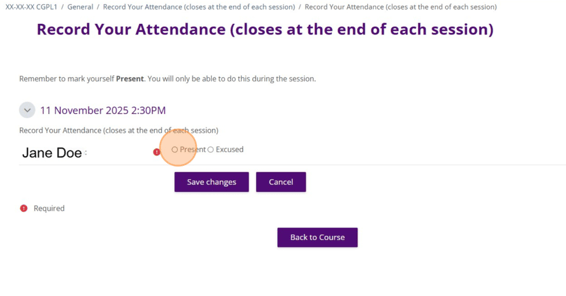
Click the "Present" field.
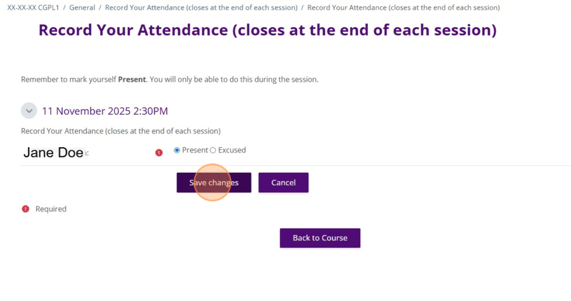
Click "Submit"
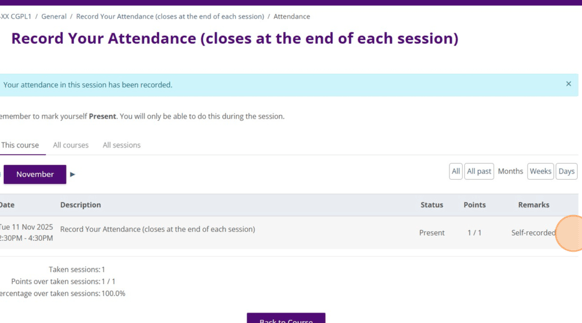
Here, you can see that you have self-recorded your attendance successfully.
- [Assessment Support](https://knowledge.ucdpa.ie/help-centre/assessment-support?hsLang=en-ie)
- [Billing & Payments](https://knowledge.ucdpa.ie/help-centre/billing-payments?hsLang=en-ie)
- [Certification](https://knowledge.ucdpa.ie/help-centre/certification?hsLang=en-ie)
- [Corporate EnrolHub System](https://knowledge.ucdpa.ie/help-centre/corporate-enrolhub-system?hsLang=en-ie)
- [External Digital Services](https://knowledge.ucdpa.ie/help-centre/external-digital-services?hsLang=en-ie)
- [General](https://knowledge.ucdpa.ie/help-centre/general?hsLang=en-ie)
- [Joining the Team](https://knowledge.ucdpa.ie/help-centre/joining-the-team?hsLang=en-ie)
- [LMS](https://knowledge.ucdpa.ie/help-centre/lms?hsLang=en-ie)
- [Masterclasses](https://knowledge.ucdpa.ie/help-centre/masterclasses?hsLang=en-ie)
- [Policies](https://knowledge.ucdpa.ie/help-centre/policies?hsLang=en-ie)
- [Professional Academy Diploma Learners](https://knowledge.ucdpa.ie/help-centre/professional-academy-diploma-learners?hsLang=en-ie#main-content)
- [Part-Time Live Online Learners](https://knowledge.ucdpa.ie/help-centre/professional-academy-diploma-learners?hsLang=en-ie#part-time-live-online-learners)
- [On Demand Learners](https://knowledge.ucdpa.ie/help-centre/professional-academy-diploma-learners?hsLang=en-ie#on-demand-learners)
- [On Campus Learners](https://knowledge.ucdpa.ie/help-centre/professional-academy-diploma-learners?hsLang=en-ie#on-campus-learners)
- [Online Bootcamp Learners](https://knowledge.ucdpa.ie/help-centre/professional-academy-diploma-learners?hsLang=en-ie#online-bootcamp-learners)
- [Professional Academy Skill Sprint Learners](https://knowledge.ucdpa.ie/help-centre/professional-academy-skill-sprint-learners?hsLang=en-ie#main-content)
- [Live Online Learners](https://knowledge.ucdpa.ie/help-centre/professional-academy-skill-sprint-learners?hsLang=en-ie#live-online-learners)
- [On Demand Learners](https://knowledge.ucdpa.ie/help-centre/professional-academy-skill-sprint-learners?hsLang=en-ie#on-demand-learners)
- [Support](https://knowledge.ucdpa.ie/help-centre/support?hsLang=en-ie)
- [Results](https://knowledge.ucdpa.ie/help-centre/results?hsLang=en-ie)
**[Log-in to Learning Management System](https://learn.ucdpa.ie/login/index.php)**
Copyright © 2025, UCD Professional Academy