---
title: I can't access my LMS account. How can I log-in and access the Masterclass Series?
description: Learn how to access the LMS for Masterclasses, reset your password, and locate the Masterclass page using your enrolment email and enrolment code.
---
[Skip to content](https://knowledge.ucdpa.ie/help-centre/masterclass-lms-support#main-content)
[Contact Us for More Support](https://knowledge.ucdpa.ie/help-centre/kb-tickets/new?hsLang=en-ie)
[](https://www.ucd.ie/professionalacademy/)
Open main navigation
Close main navigation
- [Contact Us for More Support](https://knowledge.ucdpa.ie/help-centre/kb-tickets/new)
Search our Services and Resources
- There are no suggestions because the search field is empty.
1. [Help Centre](https://knowledge.ucdpa.ie/help-centre?hsLang=en-ie)
2. [Masterclasses](https://knowledge.ucdpa.ie/help-centre/masterclasses?hsLang=en-ie)
# I can't access my LMS account. How can I log-in and access the Masterclass Series?
Our Masterclass Series is free for all current UCD Professional Academy learners, alumni and Subject Matter Experts.
### Accessing the LMS
If you have received an email about being eligible for Masterclasses and cannot access your account, please go to the LMS (Learning Management System) at **https://learn.ucdpa.ie/**.
Click 'Forgotten your username or password?'
Complete the steps that follow.
An email will be sent to you prompting you to reset your LMS password (please check your spam folder) and you will be able to access your LMS account.
**Note:** your username will be the email address that you received the Masterclass email to.
### Accessing the Masterclass Page
Once you have regained access to your account, click on *The Masterclass Series* button in your top navigation bar.

From there, click the *Enrol Me* button.
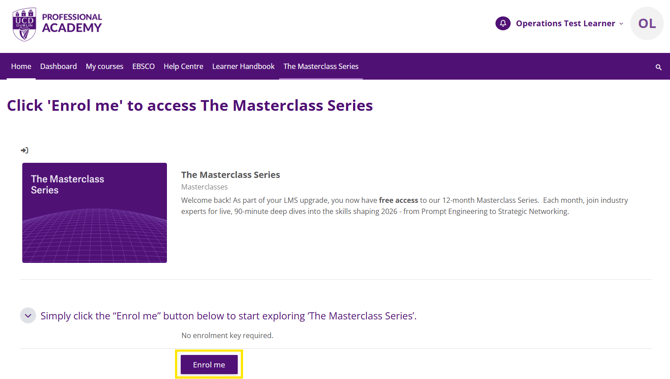
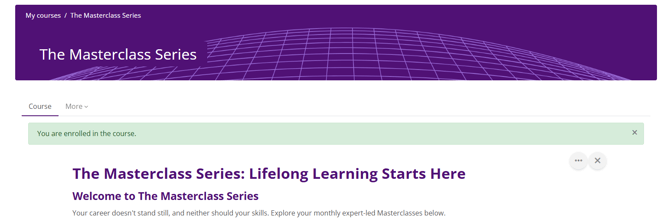
You now have access to the Masterclass course page which contains recordings from previous Masterclasses and information relating to and links to join upcoming ones.
- [Assessment Support](https://knowledge.ucdpa.ie/help-centre/assessment-support?hsLang=en-ie)
- [Billing & Payments](https://knowledge.ucdpa.ie/help-centre/billing-payments?hsLang=en-ie)
- [Certification](https://knowledge.ucdpa.ie/help-centre/certification?hsLang=en-ie)
- [Corporate EnrolHub System](https://knowledge.ucdpa.ie/help-centre/corporate-enrolhub-system?hsLang=en-ie)
- [External Digital Services](https://knowledge.ucdpa.ie/help-centre/external-digital-services?hsLang=en-ie)
- [General](https://knowledge.ucdpa.ie/help-centre/general?hsLang=en-ie)
- [Joining the Team](https://knowledge.ucdpa.ie/help-centre/joining-the-team?hsLang=en-ie)
- [LMS](https://knowledge.ucdpa.ie/help-centre/lms?hsLang=en-ie)
- [Masterclasses](https://knowledge.ucdpa.ie/help-centre/masterclasses?hsLang=en-ie)
- [Policies](https://knowledge.ucdpa.ie/help-centre/policies?hsLang=en-ie)
- [Professional Academy Diploma Learners](https://knowledge.ucdpa.ie/help-centre/professional-academy-diploma-learners?hsLang=en-ie#main-content)
- [Part-Time Live Online Learners](https://knowledge.ucdpa.ie/help-centre/professional-academy-diploma-learners?hsLang=en-ie#part-time-live-online-learners)
- [On Demand Learners](https://knowledge.ucdpa.ie/help-centre/professional-academy-diploma-learners?hsLang=en-ie#on-demand-learners)
- [On Campus Learners](https://knowledge.ucdpa.ie/help-centre/professional-academy-diploma-learners?hsLang=en-ie#on-campus-learners)
- [Online Bootcamp Learners](https://knowledge.ucdpa.ie/help-centre/professional-academy-diploma-learners?hsLang=en-ie#online-bootcamp-learners)
- [Professional Academy Skill Sprint Learners](https://knowledge.ucdpa.ie/help-centre/professional-academy-skill-sprint-learners?hsLang=en-ie#main-content)
- [Live Online Learners](https://knowledge.ucdpa.ie/help-centre/professional-academy-skill-sprint-learners?hsLang=en-ie#live-online-learners)
- [On Demand Learners](https://knowledge.ucdpa.ie/help-centre/professional-academy-skill-sprint-learners?hsLang=en-ie#on-demand-learners)
- [Support](https://knowledge.ucdpa.ie/help-centre/support?hsLang=en-ie)
- [Results](https://knowledge.ucdpa.ie/help-centre/results?hsLang=en-ie)
**[Log-in to Learning Management System](https://learn.ucdpa.ie/login/index.php)**
Copyright © 2025, UCD Professional Academy