---
title: Where can I see my course schedule?
description: Learn where to view your live session dates and times, discover details on the LMS Dashboard and the LMS drawer, and understand one way to join online sessions.
---
[Skip to content](https://knowledge.ucdpa.ie/help-centre/where-can-i-see-my-course-schedule#main-content)
[Contact Us for More Support](https://knowledge.ucdpa.ie/help-centre/kb-tickets/new?hsLang=en-ie)
[](https://www.ucd.ie/professionalacademy/)
Open main navigation
Close main navigation
- [Contact Us for More Support](https://knowledge.ucdpa.ie/help-centre/kb-tickets/new)
Search our Services and Resources
- There are no suggestions because the search field is empty.
1. [Help Centre](https://knowledge.ucdpa.ie/help-centre?hsLang=en-ie)
2. [Support](https://knowledge.ucdpa.ie/help-centre/support?hsLang=en-ie)
# Where can I see my course schedule?
There are two places to view this.
### **Place One**
Navigate to the LMS

Click "Dashboard"

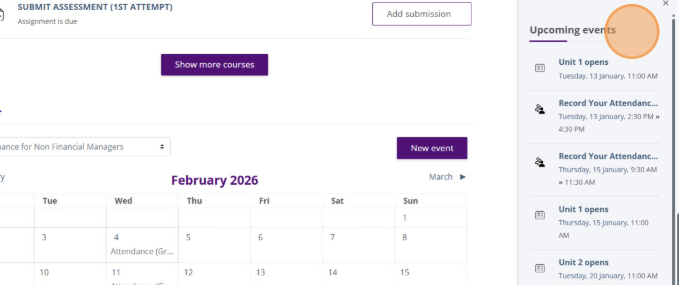
Scroll down past the 'Timeline' section to the 'Calendar' section. You can view previous and upcoming session dates and times here
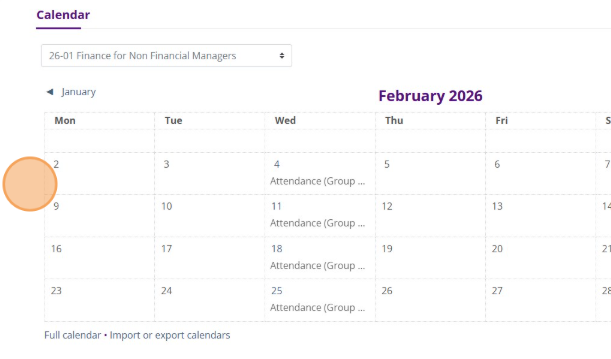
You can click on the events for more information
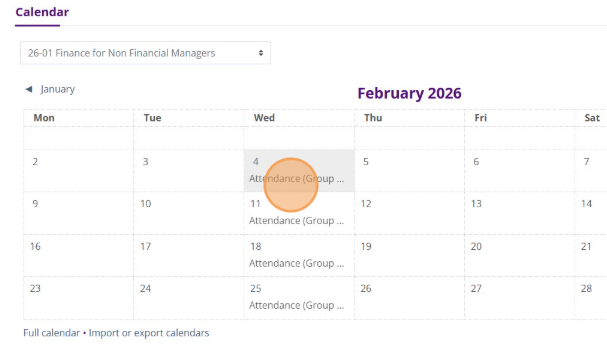
You can view the date and time of your live sessions here
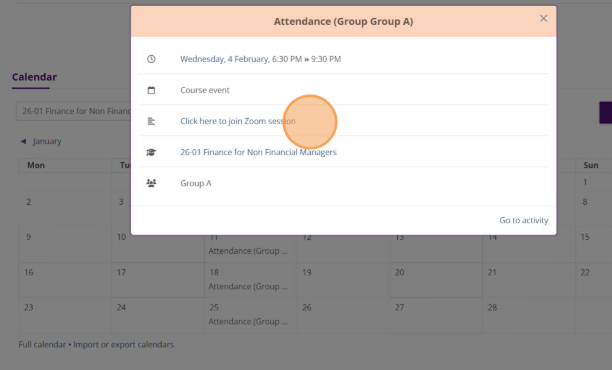
If your course is online, you can also join your online sessions from here
### **Place 2**
Click on the arrow on the right hand side of the screen to open the drawer
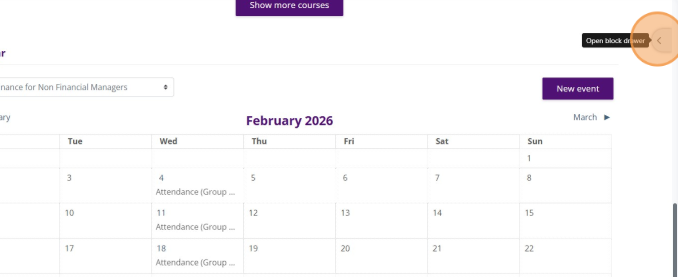
You can view your upcoming sessions here too
- [Assessment Support](https://knowledge.ucdpa.ie/help-centre/assessment-support?hsLang=en-ie)
- [Billing & Payments](https://knowledge.ucdpa.ie/help-centre/billing-payments?hsLang=en-ie)
- [Certification](https://knowledge.ucdpa.ie/help-centre/certification?hsLang=en-ie)
- [Corporate EnrolHub System](https://knowledge.ucdpa.ie/help-centre/corporate-enrolhub-system?hsLang=en-ie)
- [External Digital Services](https://knowledge.ucdpa.ie/help-centre/external-digital-services?hsLang=en-ie)
- [General](https://knowledge.ucdpa.ie/help-centre/general?hsLang=en-ie)
- [Joining the Team](https://knowledge.ucdpa.ie/help-centre/joining-the-team?hsLang=en-ie)
- [LMS](https://knowledge.ucdpa.ie/help-centre/lms?hsLang=en-ie)
- [Masterclasses](https://knowledge.ucdpa.ie/help-centre/masterclasses?hsLang=en-ie)
- [Policies](https://knowledge.ucdpa.ie/help-centre/policies?hsLang=en-ie)
- [Professional Academy Diploma Learners](https://knowledge.ucdpa.ie/help-centre/professional-academy-diploma-learners?hsLang=en-ie#main-content)
- [Part-Time Live Online Learners](https://knowledge.ucdpa.ie/help-centre/professional-academy-diploma-learners?hsLang=en-ie#part-time-live-online-learners)
- [On Demand Learners](https://knowledge.ucdpa.ie/help-centre/professional-academy-diploma-learners?hsLang=en-ie#on-demand-learners)
- [On Campus Learners](https://knowledge.ucdpa.ie/help-centre/professional-academy-diploma-learners?hsLang=en-ie#on-campus-learners)
- [Online Bootcamp Learners](https://knowledge.ucdpa.ie/help-centre/professional-academy-diploma-learners?hsLang=en-ie#online-bootcamp-learners)
- [Professional Academy Skill Sprint Learners](https://knowledge.ucdpa.ie/help-centre/professional-academy-skill-sprint-learners?hsLang=en-ie#main-content)
- [Live Online Learners](https://knowledge.ucdpa.ie/help-centre/professional-academy-skill-sprint-learners?hsLang=en-ie#live-online-learners)
- [On Demand Learners](https://knowledge.ucdpa.ie/help-centre/professional-academy-skill-sprint-learners?hsLang=en-ie#on-demand-learners)
- [Support](https://knowledge.ucdpa.ie/help-centre/support?hsLang=en-ie)
- [Results](https://knowledge.ucdpa.ie/help-centre/results?hsLang=en-ie)
**[Log-in to Learning Management System](https://learn.ucdpa.ie/login/index.php)**
Copyright © 2025, UCD Professional Academy